Never Double-Book Again
Vega's intelligent scheduling system prevents conflicts before they happen. Manage spaces, assign roles, and coordinate your entire calendar with real-time conflict detection.

Sound Familiar?
We hear these scheduling frustrations from event coordinators and administrators every day.
Double-Booked Spaces
Two events scheduled in the same room at the same time—discovered too late
No Permission Control
Anyone can schedule anything, leading to conflicts and confusion
Last-Minute Discoveries
Finding out about conflicts only when someone shows up to a booked space
Manual Conflict Checking
Scrolling through calendars manually to see if a time slot is available
Unclear Responsibilities
Not knowing who can schedule what, leading to unauthorized bookings
No Visual Overview
Can't see all spaces and schedules at once to make informed decisions
Smart Scheduling Made Simple
Real-Time Conflict Detection
As you schedule events, Vega instantly checks for conflicts. Hover over any date in your calendar to see detailed conflict information. Orange warnings appear when spaces are double-booked, when people have overlapping commitments, or when resources are unavailable. Fix issues before they become problems.
- Hover to see conflicts: Get instant details about space conflicts on any date
- Space conflicts: See which rooms are already booked and when
- Visual warnings: Orange highlights and conflict counters show issues at a glance


Manage Events with Conflict Alerts
View and manage all your events in one place. Browse upcoming events, see event details, and get instant conflict notifications. When viewing an event, prominent orange alerts show space conflicts right at the top—see which spaces are double-booked, view the conflicting events, and access the space schedule timeline to resolve issues quickly.
- Conflict alerts: Prominent warnings show space conflicts at the top of event details
- Space schedule view: See all events in a space with visual timeline indicators
- Quick conflict resolution: View conflict details and navigate to calendar view instantly
- Event list management: Browse all events, filter by status, and see conflict indicators
Centralized Space Management
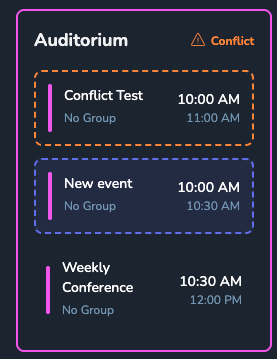
Manage all your spaces in one place. Create locations, set capacity limits, define availability windows, and track equipment. When conflicts occur, see detailed breakdowns of overlapping events—which events conflict, their exact times, and which groups are involved. Resolve conflicts quickly with all the information you need.
- Unlimited spaces: Add as many locations as you need
- Availability windows: Set when spaces can be booked
- Capacity tracking: Know how many people each space holds
Visual Calendar Views
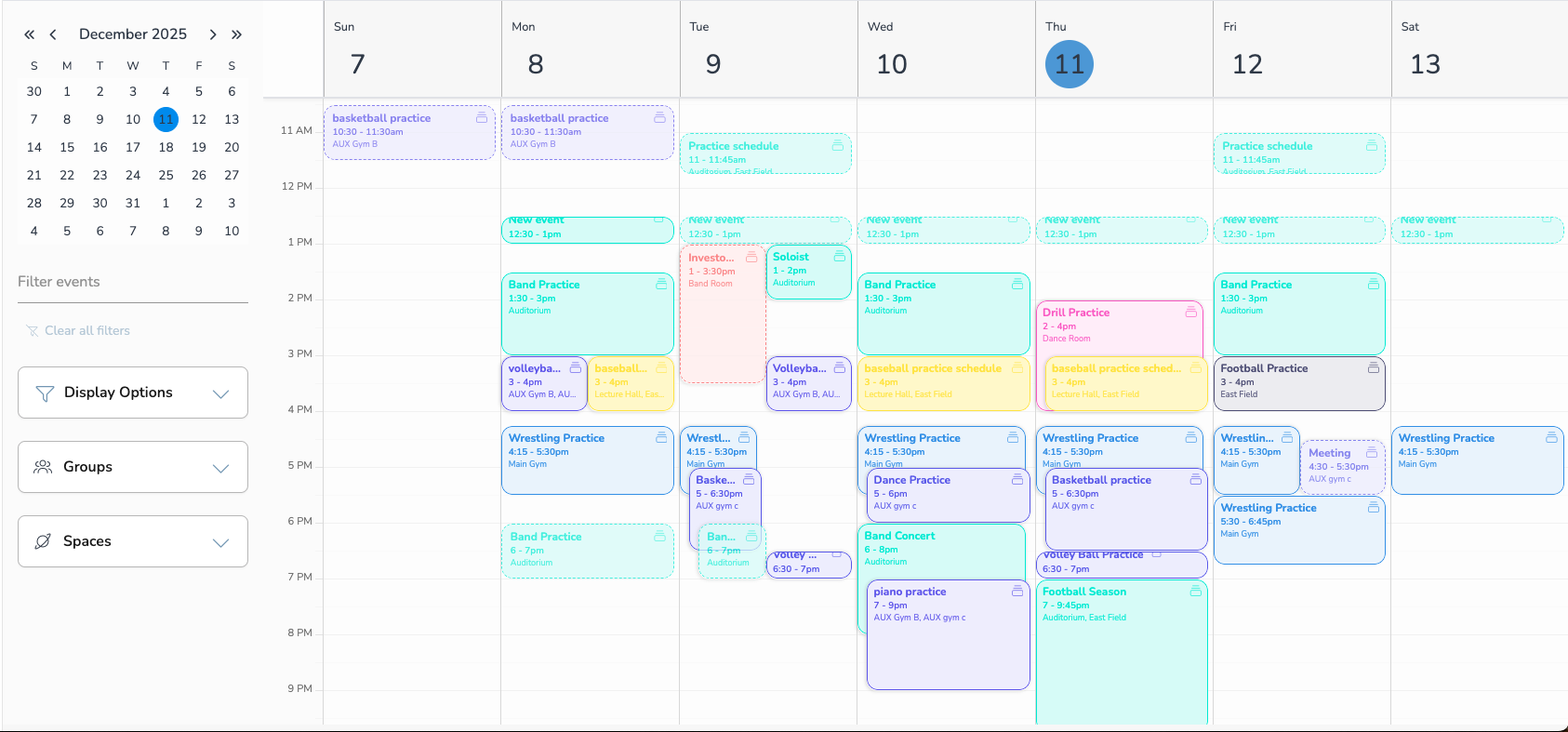
See your entire schedule at a glance. Switch between day, week, month, and agenda views. Filter by space, by group, or by person. Drag and drop to reschedule. Everything you need to manage your calendar efficiently.
- Multiple views: Day, week, month, and agenda formats
- Drag and drop: Reschedule events with a simple drag
- Smart filtering: View by space, group, or person
Perfect For Every Scheduling Need
From facilities management to team coordination, Vega handles it all.
Facility Management
Manage all your spaces—auditoriums, gyms, conference rooms, fields. See availability at a glance and prevent double-bookings automatically.
Team Coordination
Coordinate practices, games, and meetings across multiple teams. Role-based permissions ensure coaches only schedule their own events.
Resource Booking
Track equipment, vehicles, and other resources. Know what's available when and prevent scheduling conflicts for shared assets.
Multi-Location Coordination
Schedule events across multiple locations. Perfect for organizations with multiple venues, campuses, or facilities.
Recurring Schedules
Set up weekly practices, monthly meetings, or seasonal events. Automatic conflict checking for every occurrence.
Approval Workflows
Require approval for certain bookings. Set up workflows so high-demand spaces need administrator approval before confirmation.
The Old Way vs. The Vega Way
| Task | Manual Scheduling | Vega Scheduling |
|---|---|---|
| Check for space conflicts |
Manual calendar check |
Instant real-time alerts |
| Control who can schedule |
No control—anyone can book |
Role-based permissions |
| View all spaces at once |
Switch between multiple calendars |
Unified calendar view |
| Resolve double-bookings |
After the conflict happens |
Prevented before booking |
| Track space availability |
Check each space individually |
See all spaces instantly |
Zero Double-Bookings
100%
conflict prevention rate
Ready to Eliminate Scheduling Conflicts?
Join organizations using Vega to manage their schedules intelligently. Schedule a personalized demo and see how we can help you coordinate better.