Event Calendar
Use Vega's organizer calendar to see upcoming events, switch views, spot conflicts, and manage your schedule without opening every event individually.
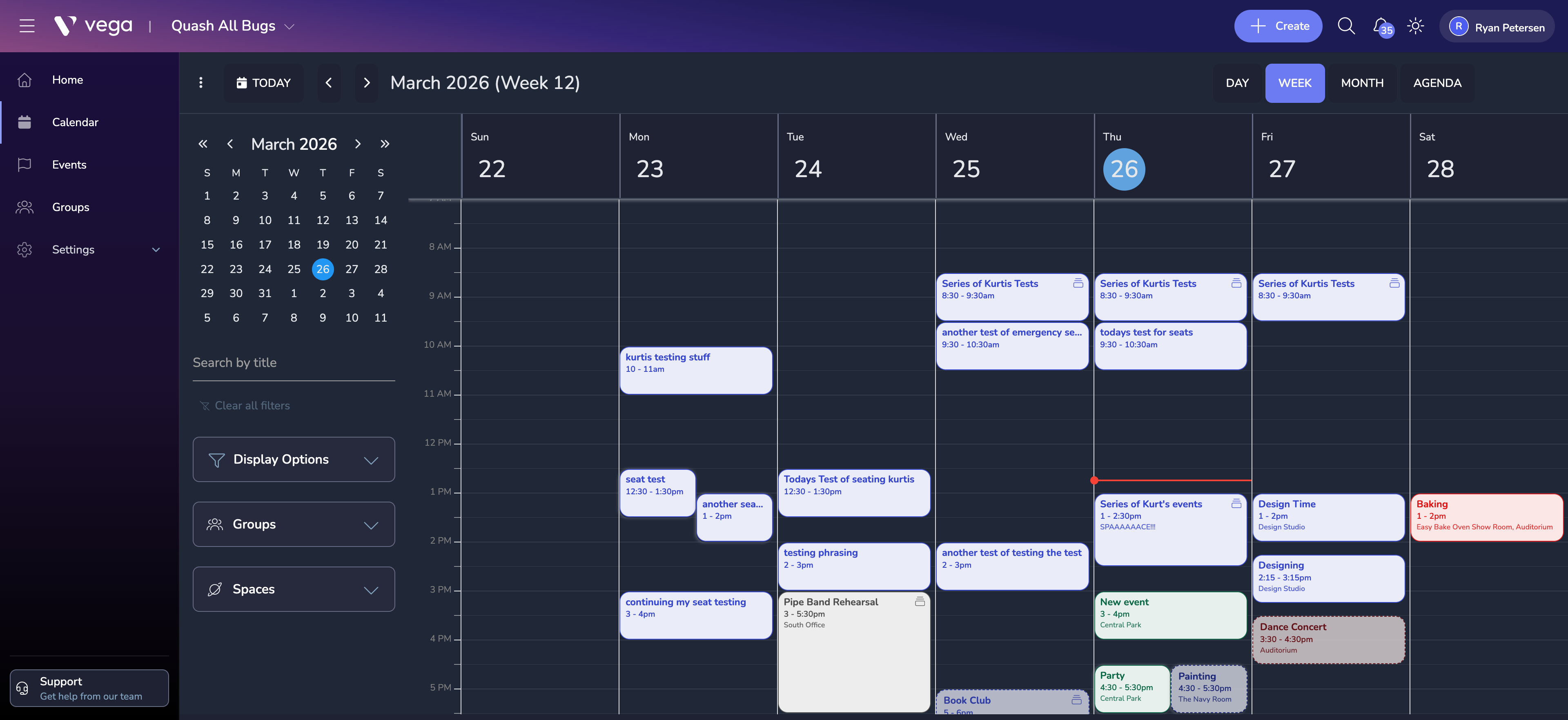
The Event Calendar provides a visual overview of all your organization’s events in a familiar calendar layout. It helps administrators plan ahead and avoid scheduling conflicts.
Accessing the Calendar
- Open the Calendar section from the admin sidebar.
- You’ll see a weekly view of all your events by default.
Calendar Features
Multiple View Modes
- Month view – see the big picture across an entire month
- Week view – plan at a more granular level
- Day view – focus on a single day’s schedule
Color Coding
Events are color-coded by status:
- Published events appear in your organization’s primary color
- Draft events appear in grey
- Cancelled events appear with a strikethrough
Quick Actions
- Click any date to start creating a new event on that day.
- Click an existing event to open a quick-view popover with key details.
- Drag and drop events to reschedule them (draft events only).
Sharing Your Calendar
You can embed your public event calendar on an external website or share a direct link:
- Go to Calendar Settings in the admin panel.
- Copy the embed code or shareable URL.
- Only published events are visible on the public calendar.
Tips
- Use filters to show events by category, venue, or ticket status.
- The calendar respects your organization’s timezone setting – make sure it is configured correctly under Organization Settings.