




We heard you

Know where every group stands on its hours

You told us practice hours lived on paper, in a coach’s notebook, or in a spreadsheet nobody else could see. Associations cap how many hours students can spend on practice and related activity each week. Activity Hours counts that time against your association’s limits, using the calendar you already keep, for teams and for drama, band, and club programs held to the same kind of cap.

See the story

What we heard

Every association sets a weekly cap on how long teams may practice, plus rest-day rules that are easy to miss. Coaches tracked it by hand. Athletic directors could not see it until something went wrong. When the association asked for records, someone spent a week rebuilding them from a calendar and a memory.

“I have twenty-six teams. I find out a coach went over their hours when someone complains, not before.”

Athletic director

“Practice is already on the calendar. I should not have to write it down a second time to prove it happened.”

Head coach

What we built

Activity Hours turns the schedule you already keep into an hour count you can hand to your association. Turn it on for any group, set the limits, and the counting takes care of itself. Each group can name it for themselves: Practice Time for a team, Rehearsal Hours for a drama department.

For coaches and directors

The calendar does most of the work

Sessions already on the group calendar count automatically. Staff log only what is not on it, like film study, a meeting, or an extra lift, and the weekly total updates as they go. See remaining hours, daily caps, and required days off in one place.

  • Scheduled events count automatically, with a switch to exclude the ones that should not
  • Nothing counts twice: if a session is logged and already on the calendar, Vega asks which one to keep
  • A day-by-day breakdown against your daily cap, so you can see where the week went
A team's weekly Activity Hours against its limit, with a daily breakdown and the sessions that counted
Log time side panel for recording sessions that are not on the group calendar
Off the calendar

Log what isn’t scheduled yet

Film study, team meetings, and extra lifts still count toward the weekly limit. Log them in a side panel while the week stays in view, so you are not rebuilding totals from memory later.

  • Date, start and end time, and the duration in one quick entry
  • Optional notes when you need context for an audit later
Before you publish

A warning before you go over, not after

When you attach a group to an event, Vega tells you if that session would push the week past the limit, before you publish. Exclude competitions, fundraisers, and other events that should not count toward practice limits.

  • Limit warnings in the event editor with hours used and what the new session would add
  • Exclude from activity hours for competitions, fundraisers, and similar events
Event editor warning that a session would exceed the weekly activity hours limit for a team
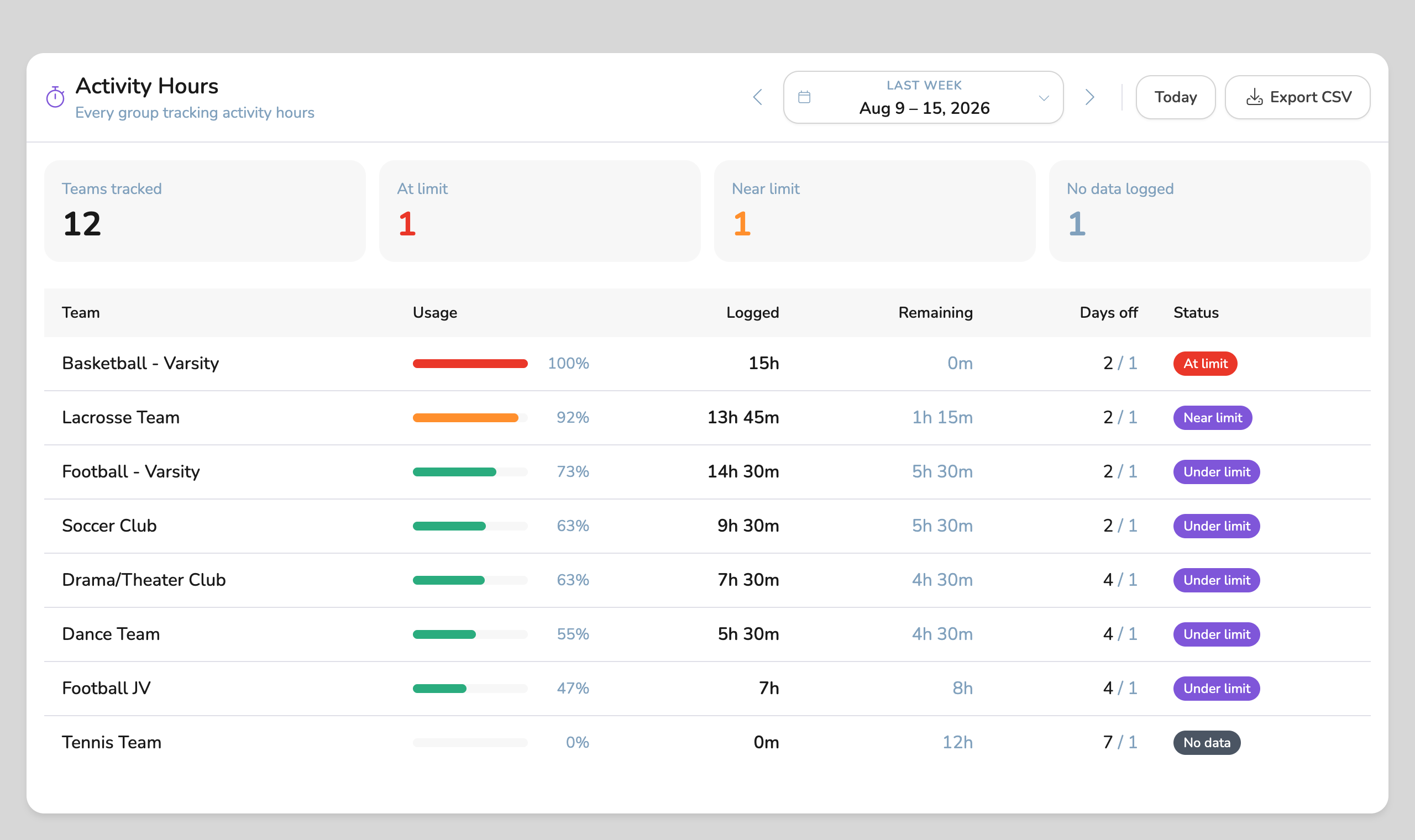
Activity Hours overview listing every tracked group with usage, remaining time, days off, and status
For athletic directors

Every group on one screen

One view across your whole program, sorted so the groups closest to their limit are at the top. Districts get the same view across every school. Export it and you have the record your association asked for.

  • At limit, near limit, under limit at a glance, for every group
  • “No data logged” is its own status, so a quiet group is never mistaken for a compliant one
  • Required days off tracked separately, because a team can be under hours and still owe a rest day
  • CSV export for any week, per school or across a district
Your rules, not ours

Set up for your association

Set the weekly and daily caps your association publishes, then adjust per group. Most set different caps by sport. In-season and off-season limits, mandatory rest days, and dead periods when nothing may be logged are all part of the setup.

  • Custom limits per group, matching the rules your association actually uses
  • Season phases so in-season and off-season limits differ
  • Blackout periods for dead periods and holiday breaks
  • Weeks that end when yours do: set your week start day and local time zone

What they're saying

Fewer surprises at the end of the week. A record that already exists when the association asks for it. And coaches spending their time coaching instead of reconstructing a schedule.

“I can see all of it on Monday morning instead of finding out in March. That is the whole difference.”

Athletic director

"Our practices were already on the calendar. Turning this on took a morning and we stopped keeping the spreadsheet."

Head coach

"When we were asked for records, I exported the weeks they wanted. That used to be a week of work."

Compliance officer

Built for association limits.

See Activity Hours in a quick demo, or explore the rest of what we have built for athletic departments and school programs held to the same kind of cap.